
Stop losing money writing repair orders on paper.

WrenchHarbor is online management software for US auto repair shops. Manage repair orders, estimates, inventory, and finances in one place, on mobile or desktop. No spreadsheets, no paperwork, no hassle.

No credit card required Get started online Works on mobile
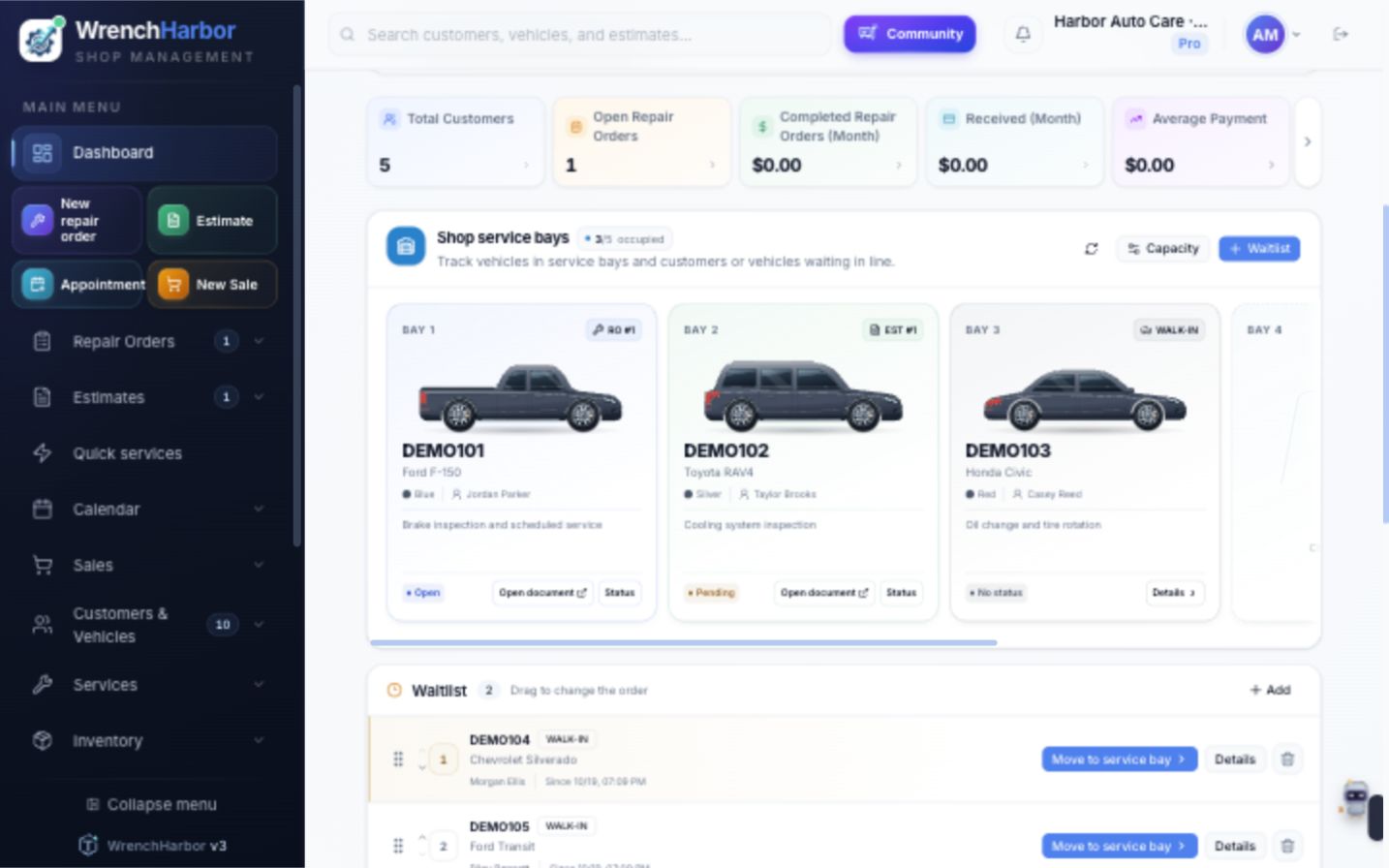
Actual WrenchHarbor dashboard with demo vehicles in service bays and a waitlist

Actual WrenchHarbor dashboard · Demonstration data

Auto Repair
Oil Change
Body Shops
Detailing
Motorcycle Repair
Auto Electrical
Auto Repair
Oil Change
Body Shops
Detailing
Motorcycle Repair
Auto Electrical
Auto Repair
Oil Change
Body Shops
Detailing
Motorcycle Repair
Auto Electrical
Auto Repair
Oil Change
Body Shops
Detailing
Motorcycle Repair
Auto Electrical

Still running your business with paperwork or on WhatsApp?

You work all month with a packed shop, but the money disappears. Estimates get lost in chats, parts tracking stays in your head, and at the end of the day, the numbers just don’t add up.

Unbilled parts, rework and missed follow-ups can quietly eat into your margin. Keep every job and every item in view.

Notes lost and scattered

Mixing personal WhatsApp with chats from dozens of customers leaves you with scattered histories, scribbles, and parts costs you can’t find when it’s time to collect.

❌
Not found

Unbilled parts

In the rush to hand over the keys, you forget to add that extra oil. Your profit goes down the drain.

Finances in the dark

If you have no idea how much your shop actually earned when closing the books at month-end, your business is at risk.

Your shop’s image is worth money

Sending a typed service list over WhatsApp looks unprofessional. Organized shops can charge more by presenting a better customer experience.

→You’re losing sales because of it.

Cutting-edge engineering under the hood.

We built the tool that turns front-desk chaos into a healthier bottom line.

Estimates that win the job

Create polished estimates with your logo, itemized parts and labor, and recorded customer approval. Share PDFs or links; optional WhatsApp requires your own connection.

PDF
Estimate #1042
Sent to John Smith
Approved
Oil Change + Filter$250.00
3D Wheel Alignment$120.00

Complete Inventory

Complete parts management. Track every stock movement, average cost, pricing, and low-stock alerts.

Cash Flow & Reports

Know exactly what’s left at the end of the month. Track income, expenses, upcoming payments, and charts for top-selling items, top customers, and peak hours.

+8%
Available on all plans

See your whole shop, bay by bay

See which vehicles are being serviced, what work is underway, and who’s next. Organize repair orders, estimates, and quick check-ins from the dashboard.

Payments & Collections

Record cash, card, check and other payments, create PDF receipts and keep authorizations with each job. This tracks payments received by your shop; it does not process your customers’ cards.

PDF ReceiptsRecorded AuthorizationsDigital SignatureInsurance Providers
Receipt #1087
Alex Morgan
$450.00
Card recorded
Print
WhatsApp
WrenchHarbor exclusive

Customers & Vehicles, Organized

Keep customer contacts, state and license plate, optional VIN, mileage and service history together. Vehicle details can be entered manually; optional VIN decoding requires separate setup.

Quick customer and vehicle setup

California · Example
DEMO123
MakeToyota
ModelCorolla LE
Year2024
Engine2.0L gasoline

Expenses & Income

Track cash flow, installments, due dates, and reports.

Income
$12.4k
Expenses
$4.2k
Net Profit$8,200.00

Itemized Invoices & Sales Tax

Prepare itemized invoices for labor and parts, with shop-configured sales tax and Letter-size PDFs. Review documents and tax treatment for your state; nationwide automatic compliance is not promised.

Pro PlanParts and laborRecorded authorizationLetter PDF
Invoice #0042
Authorized services
Issued
Estimate #0018
Parts and items
Issued
Items
PDF
Approval
WrenchHarbor Community

One shop finds an answer. Every shop learns.

Turn everyday questions into shared knowledge. Ask for help right from a repair order or estimate, find resolved diagnostics, and connect with automotive professionals in your trade.

Technical forum

Post questions and photos, and reply to topics.

Searchable solutions

Find issues by vehicle and see the repair that worked.

Community chat

Share experience in real time.

Private messages

Continue a conversation one-on-one.

WrenchHarbor Community
Shared diagnosisElectrical and electronics
AV

Andrew

Valley Auto38
Chevrolet Malibu 2021

Problem

Intermittent ABS failure after replacing the front wheel hub.

Solution applied

Cleaned the housing and corrected the wheel speed sensor gap.

Solution saved for the next shop that searches

Fictional demo content Contributions recognized with stars

WrenchHarbor MarketingBeta

Put your shop’s brand in the picture.

Preview branded graphics for your shop’s services and announcements. AI and marketing tools require their own provider setup and usage allowance before they become available.

Save time and money Feed, Story, and Status

Provider setup required. Availability and usage allowances will be disclosed in the app; no fixed monthly image allowance is included in this preview.

Fictional example of a service inspection graphic created with WrenchHarbor Marketing
Fictional design example
Supplier purchases

Know what comes in. Track what goes out.

Record supplier purchases, quantities and costs. Keep inventory movements connected to the parts your team uses and sells.

Supplier purchase

Parts and quantities recorded

Pending
Review purchase
Track inventory

Inventory and counter sales are included with all paid plans.

Technology and Control for Your Shop

WrenchHarbor offers modern tools to help your shop look professional, retain customers, and work more efficiently. Click the tabs below to see how it works:

SUV / CAR / MOTORCYCLEDEMO123
✓
Tires & Wheels (4 photos)
✓
Body & Paint (3 photos)
Check-In Video (10 sec)
Check-Out Photos
Wheels
Rear
✓ Inspection Integrated with Repair OrderDocumentation for your shop.

More control without slowing down your workflow

Advanced features organized into focused modules, without making your team fill out unnecessary screens.

Commissions

Calculated per mechanic, with partial and paid statuses.

WhatsApp Payment Reminders

Optional reminders require your own WhatsApp setup.

Post-Service Follow-Up

Optional follow-up after pickup, with provider setup.

Team

Logins and permissions by module.

Multiple Shops

Centralized management on the Multi-Shop plan.

MechanicAI

Optional AI help with provider setup and usage limits.

Printing

Repair orders and receipts on letter-size paper or a thermal printer.

Counter Sale

Counter sales without opening a repair order. Included with all paid plans.

PreviewPlanned extension

Your shop, with its own website. A connected appointment workflow.

A preview of the shop website and appointment-request experience. US shop-site hosting and automated WhatsApp confirmations require their own setup before this extension becomes available.

  • Your own shop websiteA branded page with your services, photos and hours. US shop-site hosting is a planned extension and is not activated yet.
  • Appointments around the clock, no phone callsCustomers choose a service, day, and time. Optional WhatsApp confirmation requires the shop’s own provider connection.
  • Approve requests with one tapThe planned workflow connects requests to your schedule. Automated messages require separate setup and permission.
  • A website that reflects your shopChoose a ready-made style, add your logo and colors, pin your exact map location, and preview the link customers will share.
Ask about this extension Planned US extension · hosting and messaging setup required. Preview only · no shop-site address is activated by this page.
demo-auto.wrenchharbor.com
AJoe's Auto ShopBook

Repair and electrical

Your car is in good hands, no waiting.

Request an appointmentView services
Written warranty Get directions

Customer request

Corolla 2021 DEMO123Nov 14 · exampleMorning · 8:00 AM–12:00 PM

Shop WhatsApp

Your code is 482 913

New website request

Alex Morgan · Complete inspection

Accept at 8:30 AMDecline
  1. 1Choose your addressexample.wrenchharbor.com
  2. 2Make it yoursstyle, services, and business hours
  3. 3Share your linkInstagram, Google, and WhatsApp

Simple for
real.

No lengthy training or cluttered screens. A workflow built for people with grease on their hands who need to move quickly.

1

Set Up in Seconds

Pull up service history or add a customer and vehicle plate without endless forms.

John Customer - DEMO123
Last visit 2 months ago
2

Create an Estimate & Repair Order

Choose saved parts and services, set your markup, and share an estimate PDF or link for approval. WhatsApp is optional and needs your own connection.

+ Labor + Inventory Parts Share Estimate
3

Record Payments and Manage Cash Flow

Complete the service and watch your financial dashboard update right away. Simple as it should be.

+ $850.00
PAYMENT RECORDED

While others write things down

keep every next step in view.

See how WrenchHarbor compares with the way you manage your shop today.

← Drag to compare →

Paperwork & WhatsApp

It seems free, but hides the losses

Monthly price
$0but the losses aren’t
Setup
None
Customers & vehicles
Manual
AI assistance
Separate setup
Website + scheduling
✕
Itemized invoices
Manual
Counter sale
✕
WhatsApp estimate
Typed by hand
Bays & queue
By eyeno shop overview
Mobile access
✕
Recorded authorization
✕
Mechanic commissions
✕
Multiple users
✕
Financial management
Notebook

Disconnected Tools

Separate tools, separate workflows

Monthly price
Variesby provider
Setup
Variesby tool
Customers & vehicles
Manual
AI assistance
Separate setup
Website + scheduling
✕website is up to you
Itemized invoices
Variesby tool
Counter sale
Limited
WhatsApp estimate
Limited
Bays & queue
Limitedno visual shop overview
Mobile access
Partial
Recorded authorization
✕
Mechanic commissions
✕
Team access
Variesby tool
Financial management
Complexlearning curve

WrenchHarbor

Plans from $39/month · 14-day Pro trial

Monthly price
$39–$99USD
Setup
Onlinestart with your shop details
Customers & vehicles
✓ Organizedstate, plate, optional VIN
AI assistance
Optional setupPro and Multi-Shop
Website + scheduling
Coming laterUS hosting setup required
Itemized invoices
✓ Includedshop-configured tax
Counter sale
✓ Includedwithout opening a repair order
Estimate sharing
✓ PDF or linkoptional WhatsApp setup
Bays & queue
✓ Real timeincluded with every plan
Mobile access
✓ 100%
Receipts & reminders
✓ Recordsoptional messaging setup
Mechanic commissions
✓ Completepartial payments
Team members
✓ Unlimitedall paid plans
Inventory & finances
✓ Connectedadvanced reports with Pro

The shop down the street is already using technology. Is yours?

A clearer workflow,

from start to finish.

Illustrative examples of how a job moves through your shop. These are product demonstrations, not customer testimonials.

ESTIMATE #1042

Illustrative workflow

Estimate reviewed

Labor and parts stay itemized, with customer authorization recorded before work starts.

REPAIR ORDER #1280

Illustrative workflow

Repair in progress

Your team can follow the vehicle, inspection findings and the next step in the bay.

INVOICE #0042

Illustrative workflow

Ready for pickup

The invoice, payment record and service history stay linked to the same visit.

14 days with Pro

unlocked. Free.

Every new account gets Pro features for 14 days. No card, no commitment. Just results.

A full Pro trial, with no card required

Your trial lasts 14 full days. No card is needed to test. If you choose to subscribe, payment is due immediately and your selected paid plan replaces the trial.

Unlimited Core Records

Customers, vehicles, repair orders, and estimates. Core records have no monthly cap. Media and AI have usage controls.

Inventory & Sales

Track parts coming in and going out, link them to repair orders, and sell items without opening a repair order.

Advanced Financials

Income, expenses, detailed reports, and a complete view of shop revenue.

Mechanical AI

Optional technical assistance with usage controls and separate provider setup. Review suggestions before making repair decisions.

Pro Plan

Try everything for 14 days. Free to use.

Sign up now and try comprehensive management software for US auto repair shops free for 14 days.

Start Free Trial
No credit card required
Cancel anytime
Your data belongs to you
Get started online

An investment that

pays for itself.

Grow your shop step by step. Choose the plan that fits your shop. Get started now, with no credit card required.

Essentials

The essentials for an organized daily workflow.

$39/month
  • 1 shop location
  • Unlimited team members
  • Unlimited customers, vehicles, repair orders and estimates
  • Inventory and counter sales
  • Appointments, inspections and checklists
  • Basic finances
Start 14-day Pro trial

No card required · USD

Recommended

Pro

The complete toolkit for a growing independent shop.

$59/month
  • Everything in Essentials
  • Advanced finances and profitability
  • Mechanic commissions
  • Detailed management reports
  • AI assistance with usage controls
  • 1 shop location
Start 14-day Pro trial

No card required · USD

Multiple locations

Multi-Shop

Bring your shop locations together in one workspace.

$99/month
  • Everything in Pro
  • Multiple shop locations included
  • Shared access across your locations
  • Consolidated management reports
  • Permissions for each team member
  • Unlimited team members and core records
Start 14-day Pro trial

No card required · USD

All plans include unlimited team members and core records. Storage, video, AI and optional integrations have usage limits. WhatsApp and AI require separate provider setup. Try Pro free for 14 days without a card. If you choose to subscribe, the first payment is due immediately; successful payment starts your selected plan and ends the free trial. Subscriptions renew automatically until canceled.

Have a question? Talk to our team

Stay connected to your shop

Share estimates and approvals using links and PDFs. Optional WhatsApp features require your shop’s own connection and provider setup.

Ask about communication options

Explore the plans: Explore the exclusive Community

Frequently Asked Questions

01

Do I need to download and install WrenchHarbor on my computer?

No. The system runs entirely in the cloud. Access it in a browser on your phone, tablet, or computer. There’s no need to pay for servers or IT maintenance.

02

Can I use the system on my phone in the shop?

Yes! WrenchHarbor uses modern app technology and adapts to your phone, so you can open a repair order or take photos right at the lift.

03

How does WrenchHarbor AI work?

Pro and Multi-Shop include AI assistance subject to usage controls and provider availability. Review suggestions before using them for a repair decision.

04

What happens to my data if my internet goes out?

WrenchHarbor needs an internet connection. Records already saved remain in the cloud; reconnect before continuing, and check that your latest changes were saved.

05

Does it work for motorcycle shops, detailing, and body shops?

Yes. WrenchHarbor serves automotive businesses such as repair shops, service centers, detailing shops, body shops, oil-change shops, and paintless dent repair businesses. The workflow adapts to your business.

06

Is there a long-term contract?

There’s no long-term commitment. Subscribe and cancel anytime in the system without contacting anyone. Cancellation does not automatically delete your data. See the Terms of Service and Privacy Policy.

07

How many employees can use the system at the same time?

All paid plans include unlimited team members. An administrator chooses which modules each person can view or edit. For example, technicians can work with repair orders while service advisors manage customers and estimates. Each person has a separate login.

Is my data secure?

We use encrypted connections and access controls to help protect shop records. Each shop has its own permissions and data boundaries; no online system can promise absolute security.

09

How does WrenchHarbor Marketing image creation work?

AI and marketing tools require provider setup and have usage controls. Availability and allowances will be disclosed in the app before use; no fixed monthly image allowance is promised here.

How will shop websites and online booking work?

The planned extension connects a shop-branded website with appointment requests in the system. US shop-site hosting is not activated yet. A shop address, automated messages and optional WhatsApp confirmations require separate setup before this extension becomes available. The preview uses synthetic examples and does not activate a shop website.

Who can access the WrenchHarbor Community, and how does it work?

The WrenchHarbor Community has three areas: Forum, Problems and Solutions, and Global Chat, where shops can share questions and technical knowledge. Members can also exchange private text messages. You can ask for help from a repair order or estimate, post photos, reply, and recognize helpful contributions with stars. Access is included during the trial and with Essentials, Pro, and Multi-Shop plans; Read-only does not include access after the trial ends.

Didn’t find your answer? Contact support

No credit card required

Take your shop to the next level today.

Get started with a 14-day Pro trial. Put paperwork aside, centralize your estimates, and take control of your business in seconds.

Start Free TrialInstant setup • Cancel anytime
Contact support